Public Wi-Fi vs Mobile Data: Which Is Safer Abroad?
Public Wi-Fi or mobile data when you travel? How the risks differ, what the FCC and other agencies advise, and how to stay online abroad without handing over ID.
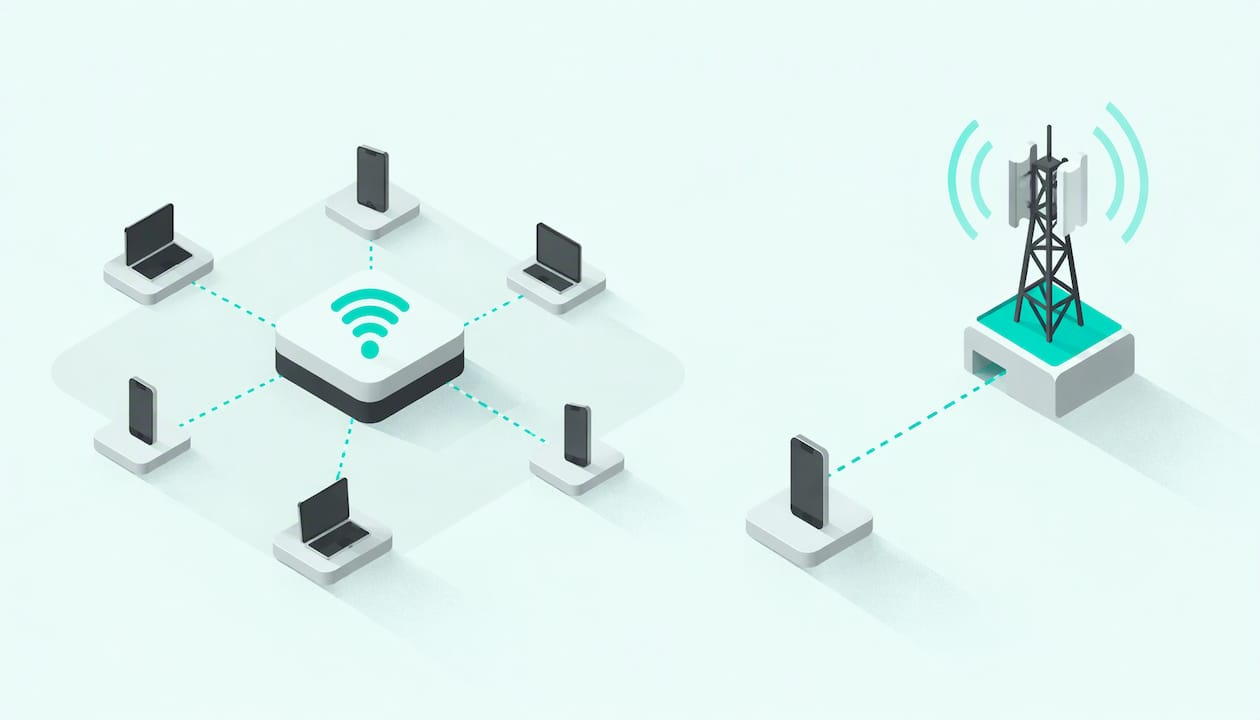
For anything sensitive, mobile data is the safer default abroad. It keeps you off a network shared with strangers and run by someone you can't vet. Public Wi-Fi is fine for low-stakes browsing if you take a few precautions. The catch for privacy-minded travelers is that local SIM cards often come with registration rules, so many people end up on café and airport Wi-Fi by default. A data-only eSIM that needs no ID or sign-up, like the one we sell at Silent eSIM, removes that trade-off.
TL;DR
- Mobile data avoids the shared local network, which is where most public Wi-Fi risks (fake hotspots, snooping, exposed devices) come from.
- The FCC says that for sensitive information, your cellphone data plan may be more secure than Wi-Fi.
- Mobile data is not magic: for most travelers the remaining risks are small, and a few simple settings cover them.
- You don't need to hand over ID or create an account to get data abroad: our data-only eSIM charges from $0.76/GB depending on the country, and the balance never expires.
- If you must use public Wi-Fi, confirm the network name, stick to HTTPS sites, turn off auto-join, and keep banking off it.
How public Wi-Fi and mobile data actually differ
Wi-Fi is a short-range wireless network. Your phone talks to a router in the café, hotel or airport, and that router connects you to the internet. Mobile data works differently: your phone connects to a carrier's cell towers. Gibraltar's telecom regulator describes the difference in just those terms: Wi-Fi is local and usually has no data limit, while mobile data runs over a mobile network, is metered, and its main benefit is portability when Wi-Fi isn't there.
That structural difference is the whole security story. On public Wi-Fi, you share a network with every other customer, and the person who set it up decides what you connect to. On mobile data, you connect to a carrier's network with your own connection, so there's no stranger's router and no shared local network in between.
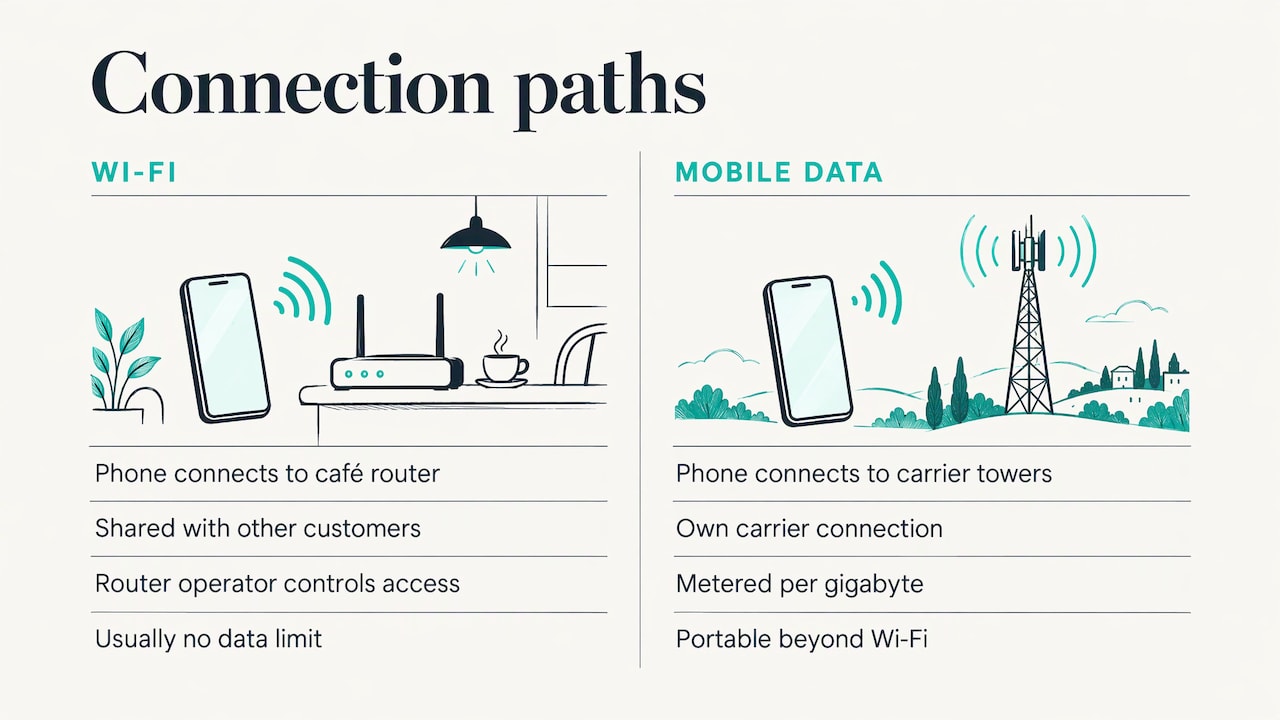
Cost is the other difference. Wi-Fi feels free, and mobile data is billed per gigabyte. Abroad, that's where travelers get caught: roaming charges on a home plan can make data expensive, which pushes people toward whatever Wi-Fi is nearby. Pay-as-you-go local-rate data changes that math, and we come back to it below.
Is mobile data safer than public Wi-Fi?
For the situations travelers actually face, yes. The FCC's consumer guide warns that public Wi-Fi is risky because hackers can access your connection and compromise sensitive information. It adds that when you're sending something sensitive, using your cellphone data plan instead may be more secure.
A New York Times explainer on the security of cellular connections draws the same contrast. On a typical 4G LTE connection, your data is encrypted and your identity is authenticated. Wi-Fi varies enormously: an open network lets anyone nearby intercept information, while a password-protected one can have strong encryption.
A PSafe security article makes the practical point: mobile data is usually safer because you don't join a shared local network, and a properly configured WPA2 or WPA3 network combined with HTTPS can be used safely too. So the honest answer is not "Wi-Fi bad, data good." It is that mobile data removes a whole category of risk you can't check for yourself, while Wi-Fi's safety depends on a router you know nothing about.
What can go wrong on public Wi-Fi
Canada's Get Cyber Safe program lists the main risks:
- Eavesdropping and hacking on unsecured networks.
- Malware spreading to devices that are out of date.
- "Evil twin" hotspots: fake networks with names similar to the real one, so you join the attacker's network thinking it's the café's.
The evil twin is the one that matters most abroad. In a foreign airport you may not know what the real network is called, and you can't read a sign in another language. An attacker only needs a plausible name. Once you're on their network, they can try to show you deceptive websites or watch what isn't encrypted.
The broader picture is nuanced. Most websites now use HTTPS, so the content of your traffic is often protected even on a bad network. Encryption is largely solved for ordinary browsing; the open risk is making sure the network is the one you think it is. That is why the guidance below keeps returning to the network name and the padlock.
What remains on mobile data
Mobile data isn't a force field. The same Times piece notes that 4G LTE software is not impenetrable: researchers found vulnerabilities, but they would take significant effort to exploit and would likely target high-profile individuals.
A 2026 guide from NHIMG explains one example. On 4G LTE, some messages exchanged before authentication are unprotected, so a fake cell tower can harvest a device's identifier or push a phone down to 2G. That guide separates the threat clearly: surveillance-grade fake towers are aimed at specific people such as executives, journalists and staff traveling to high-risk countries. For those travelers it suggests turning off 2G, using iOS Lockdown Mode, relying on end-to-end encrypted messaging and avoiding SMS one-time codes.
For an ordinary traveler or nomad, the threat is the common criminal one, and that is exactly the threat mobile data sidesteps. If your work puts you in the higher-risk group, those extra steps are worth taking on top of mobile data.
Public Wi-Fi vs mobile data at a glance
| Public Wi-Fi | Mobile data | |
|---|---|---|
| Who you share a network with | Everyone in the venue | No shared local network |
| Who sets it up | The venue, or an impostor | A mobile network |
| Fake-hotspot risk | Yes, the "evil twin" | Not applicable in the same way |
| Encryption you control | Depends on the router and site | Encrypted on typical 4G LTE connections |
| Cost | Usually free | Metered per gigabyte |
| Works on the move | Only inside range | Wherever there's coverage |
Why travelers end up on public Wi-Fi anyway
If mobile data is safer, why does everyone use hotel and airport Wi-Fi? Three reasons come up again and again for travelers.
- Roaming cost. Data from your home carrier abroad can be pricey, so people avoid it.
- Setup friction. Local SIM cards mean a shop visit, a queue, and often paperwork at the counter.
- Identity. Registering a SIM can mean handing over a passport and other personal details, which privacy-minded travelers would rather not do just to check a map.
The third reason is the one this article's reader cares about. Choosing between "share my passport details" and "use unknown Wi-Fi" is a bad choice, and you shouldn't have to make it. If you want the long version of that argument, our guide to private roaming goes through it.
Getting mobile data abroad without handing over ID
Our eSIM is built for that case. Silent eSIM is a data-only, pay-as-you-go eSIM for 200+ countries with no ID and no sign-up needed to buy. With crypto checkout you can buy an eSIM with no email (card checkout asks for billing details), and nothing about the purchase asks for a passport.
Here is how it works in practice:
- Check your phone is eSIM-compatible. Our how it works page walks through buying and installing.
- Top up a USD balance, from $5. There is a one-time $4 setup fee, so the smallest start is $9.00 in total.
- Pick your payment method. Cards work up to $200. You can also pay with BTC or XMR through BTCPay, and other coins are swapped to XMR via Trocador. There is no Lightning.
- Install and connect. Data starts from $0.76/GB, and the price varies by country.
- Keep the balance. It never expires, so what you don't use on this trip is there for the next one.
You can check what a given country costs on our price-per-GB tool or see the full rates. If you want to know how much you'll need, the eSIM data calculator estimates it for your trip. Our no-KYC eSIM checklist is the one to read if you want to know what a genuinely no-ID purchase looks like.
Sizing your data so Wi-Fi isn't tempting
People fall back on public Wi-Fi when they're afraid of running out of data. Streaming is the main reason. One 2026 guide puts HD video at roughly 1 to 3 GB an hour and 4K around 7 GB an hour. Maps, messaging, email and banking use a small fraction of that.
A workable approach for a trip:
- Use mobile data for everything that involves a password, a payment or personal documents.
- Download videos and large files before you travel or on a trusted network, such as your accommodation's password-protected Wi-Fi, so they don't eat your balance.
- Top up in small steps. Because the balance doesn't expire, you never lose what you don't spend.
Working from a laptop: using the hotspot safely
Digital nomads need their laptop online, not just their phone. Our eSIM has hotspot enabled, so the phone's connection can be shared with a laptop. That gives you your own private network in place of a café's, which is the safest way to work from a public space.
A phone hotspot is only as secure as its password. BGR notes that a weak or observed password can let someone connect, use your data or watch traffic. Safe use comes down to:
- Set a long, unique hotspot password and don't type it where others can see the screen.
- Switch the hotspot off when you're not using it.
- Keep an eye on battery: hotspots draw more power, so keep a charger or power bank within reach.
Those habits take a minute and give you a working setup that beats any shared network.
If you do use public Wi-Fi: a short rulebook
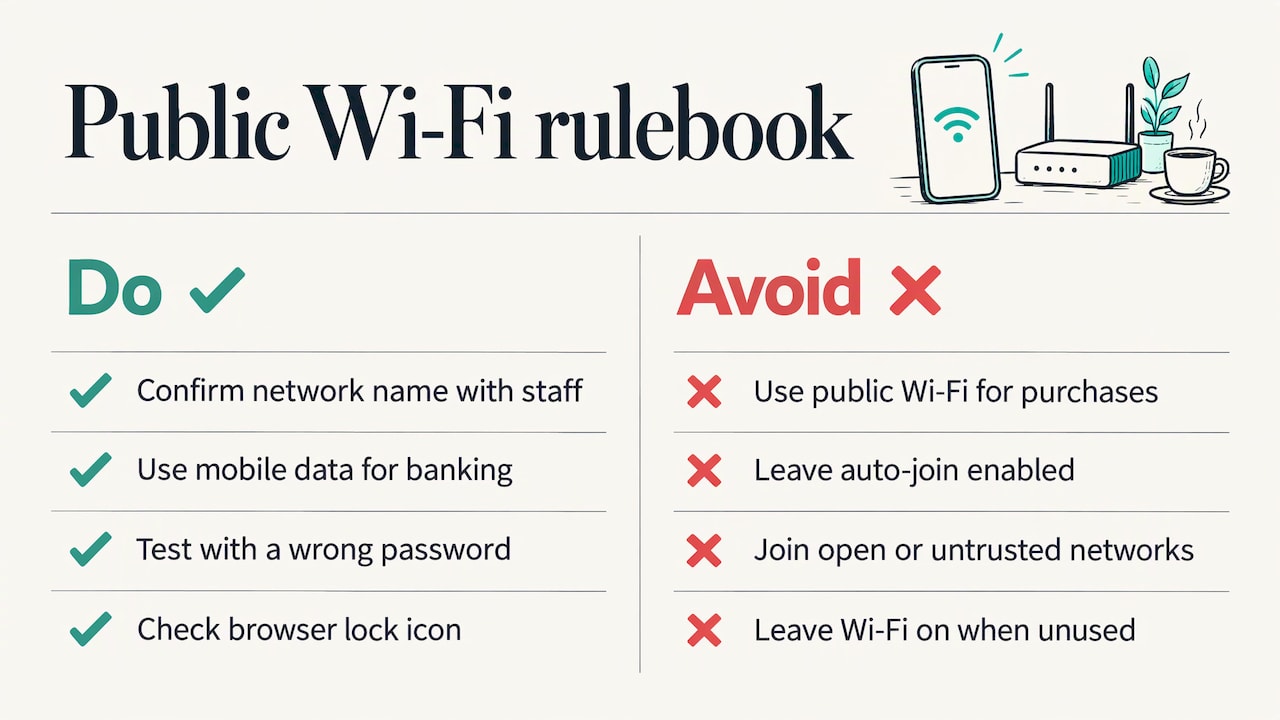
Sometimes you will. A hotel network with a room-specific password, or a long layover with a dead battery, is a reasonable case. Official guidance from several governments agrees on what to do.
Confirm the network. Global Affairs Canada says to confirm the Wi-Fi network name before connecting. The FCC advises checking with staff to detect imposter hotspots.
Keep sensitive tasks off it. The FCC's guidance for international travelers says not to use public Wi-Fi for online purchases or bank accounts. Switch to mobile data for those.
Turn off auto-join. If your phone joins any network it remembers, it can join a fake one with the same name. The FCC recommends disabling auto-connect to unknown Wi-Fi.
Test the network. The FCC's travel guide suggests deliberately entering the wrong password. A real password-protected network should reject it. If it lets you in, walk away.
Stick to HTTPS. Check the padlock in your browser. Get Cyber Safe notes that browsers no longer display the full URL scheme, so look for the lock icon.
Consider a VPN. Both the FCC and Global Affairs Canada mention a VPN, a tool that encrypts your traffic between your device and a server, for people who use public Wi-Fi regularly or can't avoid it.
Turn Wi-Fi off when you don't need it. The Australian Cyber Security Centre advises personnel to avoid open or untrusted Wi-Fi networks and to consider disabling Wi-Fi, Bluetooth and NFC when not in use.
Clean up afterward. The FCC recommends updating security software and changing passwords on your devices after returning home.
The tone of this advice has hardened lately. A November 2025 Forbes report says Google told smartphone users to avoid public Wi-Fi whenever possible, and notes the TSA had earlier told travelers not to use free airport Wi-Fi.
Calls and verification codes abroad
A data-only eSIM covers internet, not a phone number. If you need to receive a verification text without exposing your main number, we offer UK mobile number rental for SMS reception, from $13.30, through a private browser inbox with no SIM profile. Details are on the UK number rental page.
That helps with a privacy point from the NHIMG guide: it recommends high-risk travelers avoid SMS one-time codes on their main number. A separate number for the codes you can't avoid keeps your main number out of it.
What Silent eSIM gives you
If you want mobile data abroad without public Wi-Fi and without showing a passport, here is the offer in one place. A global data eSIM starts at $9.00: a $5 minimum top-up plus the one-time $4 setup fee. Data is from $0.76/GB, the balance never expires, hotspot is enabled, and you can pay by card or crypto, including Monero. It covers 200+ countries, so one balance works from trip to trip.
If you're ready, get your eSIM or read about the anonymous eSIM first. Our prepaid, pay-as-you-go eSIM page covers top-ups.
FAQ
Is mobile data safer than public Wi-Fi?
For sensitive tasks, generally yes. Mobile data avoids the shared local network, and the FCC says a cellphone data plan may be more secure than Wi-Fi when you're sending sensitive information. Public Wi-Fi can be used safely if it is properly secured and you stick to HTTPS sites, but you can't verify that yourself in a foreign airport.
Should I avoid public Wi-Fi abroad entirely?
You don't have to, but keep it for low-stakes browsing. Use mobile data for banking, purchases, work logins and anything with a password. If you do join public Wi-Fi, confirm the network name with staff, turn off auto-join and look for the HTTPS padlock.
Can I get mobile data abroad without showing ID?
Yes. Our data-only eSIM needs no ID and no sign-up to buy. You top up a USD balance from $5, pay a one-time $4 setup fee, and pay by card (up to $200) or by BTC or XMR through BTCPay.
Do I need a VPN if I use mobile data?
Not for the same reasons you would on public Wi-Fi. The FCC and Global Affairs Canada mention VPNs mainly for people who use public Wi-Fi regularly or can't avoid it. Travelers in higher-risk countries may choose to add one, along with the extra phone settings the NHIMG guide describes.
Can I use my phone as a hotspot for my laptop?
Yes, hotspot is enabled on our eSIM. Set a long, unique hotspot password, turn the hotspot off when you're finished, and keep a charger nearby.
Sources
- What is the difference between Mobile Data and Wi-Fi? (GRA, Gibraltar)
- Wireless Connections and Bluetooth Security Tips (FCC)
- Cybersecurity Tips for International Travelers (FCC)
- The Security of Cellular Connections (The New York Times)
- Mobile Data or Public Wi-Fi: Which Is Safer? (PSafe)
- IMSI Catchers and Cellular Baseband Security Guide (NHIMG)
- Public Wi-Fi (Get Cyber Safe, Canada)
- Cyber security while travelling (Global Affairs Canada)
- Guidelines for enterprise mobility (Australian Cyber Security Centre)
- Stop Using Public Wi-Fi, Google Warns (Forbes)
- 7 Reasons Why Mobile Hotspots Might Not Be As Reliable (BGR)
- What Is a Mobile Hotspot? (Fusion Fibre)
Recommended
Keep reading
More guides from the Silent eSIM blog.
- privacy
Private Roaming Explained
What private roaming can and cannot protect: no-KYC purchases, payment records, mobile-network visibility and practical ways to compare travel data costs.
Read Private Roaming Explained → - guides
Data-Only eSIM: What It Is and How to Use One Abroad
A data-only eSIM gives you mobile internet abroad with no number, calls or texts. How it works, what it costs on a pay-as-you-go balance and how to set one up.
Read Data-Only eSIM: What It Is and How to Use One Abroad → - guides
PDP Authentication Failure: What It Means and How to Fix It
Seeing "PDP authentication failure" or "Could not activate mobile data network" abroad? What it means and the order of fixes that gets a travel eSIM back online.
Read PDP Authentication Failure: What It Means and How to Fix It →